We appreciate the preference with which you distinguished us. From now on, we are at your disposal for any issue related to your new Qualified Digital Certificate.
So we want to help start a completely new way to sign your documents. For this, we ask you to follow the instructions below to install on your computer the drivers and middleware needed to use your Qualified Digital Certificate.
Steps to be accomplished
First, confirm which drivers you need to install and, Next, download middleware to your Desktop. If you have received your certificate from 11 March 2026, Then install the available drivers below:
Then, after downloading, install the software, following the instructions given by the configuration assistant.
IMPORTANT NOTE: During installation, if a window appears requesting that the computer be restarted, Then click "NO". You should only restart the computer after all software have been installed (drivers and middleware).
TOKEN USB Feitian – SCR 301
Chip Replacement
To replace the chip lodged in your Feitian SCR 301 player, follow these steps:
Step 1
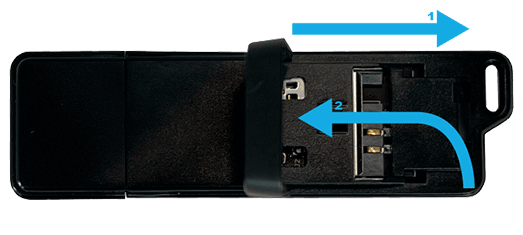
Open your Feitian SCR 301 player: Slide the opening zone on the side of the USB Token to the outside and as soon as you feel it is loose, lift it.
Step 2
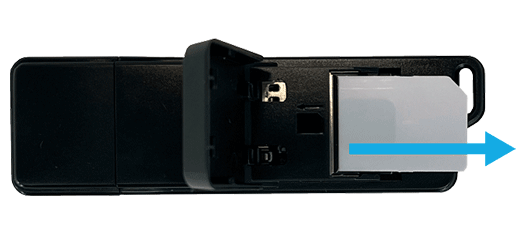
Once opened, remove the old chip, pulling it lightly with your finger.
Step 3
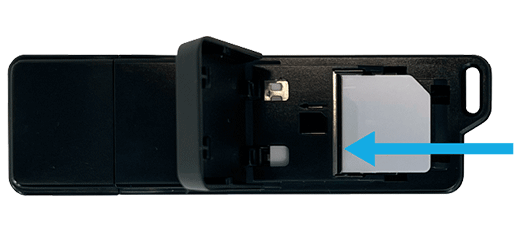
Then enter the new chip at the previous location and reclose the USB Token.
Step 4
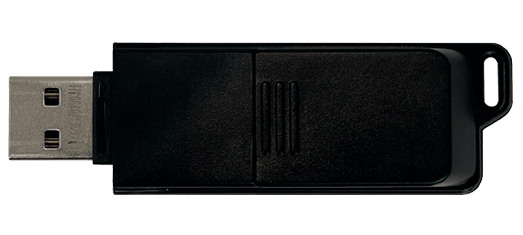
Finally, close the Token USB cap by pressing until you hear a small click.